Running a successful charity fundraising event requires meticulous planning, and one of the most critical components is leveraging technology to provide a seamless experience for your guests, volunteers and staff alike.
You are already leveraging the power of software, like Greater Giving, but you are also going to need some hardware to truly make the most of it. Whether it’s laptops, iPads, Internet hot spots or laser printers, here are some best practices for optimizing your equipment needs:
 Step 1. Decide how many stations you will need.
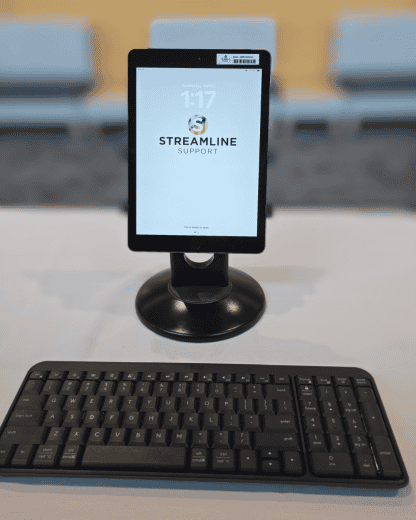
At Streamline Support, we consider a “station” to be either a laptop or a tablet like an iPad, along with a credit card reader.
Our formula, that has served our clients well for the 20 years we have been helping to run their fundraising events, is actually pretty simple, and here it is:
Number of guests divided by 75 plus 1.
So, if you expect 300 guests, the formula would be 300/75+1. In this case you would want 5 total stations. Taking this a little further, we would set up 4 to act as primary check in stations, and 1 to use as a help/troubleshooting station.
Note that this is just a baseline. If all 300 of your guests are couples sharing bid numbers, you could reduce the number of stations. On the other hand, if you are holding a luncheon, where all your guests are using individual bid numbers *and* will arrive in a short period of time, you will want to increase the number of stations. I personally feel that you should always err on the side of having too many stations, simply because it’s difficult to predict whether your guests will all show up at the same time. And no one likes to stand in line!
Step 2. Decide what type of stations you will need.
For the last several years, we have always preferred to use laptops for check in stations. Our clients typically use volunteers to run check in, and we have found that laptops, with their large screens, full size keyboards and external mice make life easier for everyone involved. However, with the new bluetooth readers available from Greater Giving, we are starting to incorporate iPads (with stands and keyboards.) These look great on the table and because they run on battery for hours, you don’t need power. Other considerations will be if you will be doing some printing. We always recommend having a good black and white laser printer on hand. In that case you will want a laptop to run the printer.
Step 3. Be prepared and have backups!
It’s easy to overlook things like extension cords and power strips when planning for your event. If you have access to your venue prior to your event, be sure to map out where the closest power outlet is in relation to where your check in tables will be. And if you are bringing a printer, make sure to have backup toner on hand. Finally, have a backup Internet connection. You can rent an Internet hotspot or in some cases, use your phone as a hotspot. Greater Giving is totally web based, and you don’t want to be solely reliant on the venue for web access!
Step 4. Designate a lead for your tech.
Whether you hire on site support, use a volunteer, or have one of your staff in charge, having a single point person ensures that things don’t get missed. Be sure to provide them with a checklist so they are prepared on event day. Here’s a sample:
- Laptop or iPad (one for every 75 guests plus an extra). Don’t forget power supplies or to fully charge your iPads!
- Laser printer, paper and backup toner
- Internet hot spot
- Extension cord (25 feet)
- Power strips (one for every 2 stations)
- Basic office supplies (pens, highlighters, scissors, stapler etc.
Step 5. Setup early.
At Streamline Support, we arrive 3 hours before guests arrive, but if you have the luxury of setting up earlier than that, we would recommend you do. This allows you to be fully setup and have all your tech tested well before the event starts. Remember, a great event is a boring event (when it comes to technology).
Please visit us at Greater Giving – Streamline My Event! if you have any need for on site support, technology rentals or both. Thank you!