It’s 6:47 PM. Doors opened at 6:30. The line of guests stretches out the lobby. Your check-in volunteer is squinting at a printed spreadsheet, scanning for a last name with the tip of a Sharpie.
Down the hall, your auction lead is hunting for a bid sheet that someone moved. And in three hours, you’ll watch the night end the way it always does: a line at checkout, a stack of credit card slips, and a “we’ll send you your final tally next week” smile from a treasurer who is ready to go home.
It doesn’t have to be like this.
The “day of” your event — the moments you’ve spent six months planning toward — should be the easiest, most fluid part of the whole campaign. Greater Giving built Go Time to make sure it is.
Meet Go Time
Go Time is your event night dashboard, the on-site command center inside Greater Giving Event Software that ties check-in, bidding, sales, and check-out into one connected workflow. Instead of clipboards, paper sheets, and three different spreadsheets fighting for the same data, your team works from one screen — on tablets, laptops, or whatever device they already have in hand.
It’s built specifically for the people running your event in real time, which means the chaos that usually lives in clipboards lives somewhere a lot calmer instead.
Phase 1: The First Impression (Check-In)
Check-in isn’t just logistics, it’s the first impression your event makes.
With Go Time, your volunteers can:
- Search for a guest’s registration in seconds
- Verify or update contact info on the spot
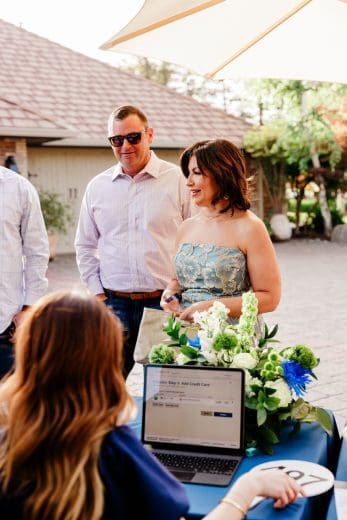
- Capture a credit card with Express Pay the moment a guest walks in
- Hand off bidder numbers, table assignments, and event materials in one motion
Greater Giving advantage:
When you pair Go Time with Auctionpay and Mobile Card Readers, volunteers can run check-in from anywhere in the room — cocktail-height tables, lobby stations, even VIP fast lanes. And if you’re using Greater Giving Mobile Bidding, bidder numbers and table assignments can be sent automatically by welcome text, so guests can skip the paperwork and head straight to the bar. Cheers!
Phase 2: The Main Event (Sales & Bidding)
Once guests are in the room, Go Time shifts into sales mode — and this is where most of the night’s revenue gets locked in.
Features built to make bidding a breeze:
- Bid Assistant lets volunteers bid for guests from a tablet or laptop. Set up bidding stations, send volunteers walking through the venue, and meet guests where they are.
- Auctioneer Display lets your auctioneer recognize guests by name during the live auction or fund-a-need. The whole room feels seen, and that visibility is contagious.
- Storefront turns Go Time into a point of sale. Raffle tickets, drink tickets, t-shirts, auction game entries — anything you want to sell on the fly gets added straight to a guest’s account, no separate spreadsheet to reconcile in the morning.
Greater Giving advantage:
Every bid, sale, and pledge flows into the same system in real time. Your auction lead spends the night encouraging bids, not chasing them — and your final tally is locked in before the lights come up.
Phase 3: The Grand Finale (Check-Out)

Here’s where Go Time genuinely earns its keep.
Because every guest’s card was already captured at check-in with Express Pay, Express Check-Out does the heavy lifting at the end of the night. One reconciliation pass, and every guest is charged for everything they won, bought, or pledged.
What that means for your team:
- A single batch settles the entire event
- Receipts go out by email or text — individually as guests leave, or as a batch once the books are reconciled
- Final totals are already in your dashboard before the auctioneer’s mic is back in the case
The “we’ll get back to you next week” line goes extinct.
Greater Giving advantage:
Express Check-Out doesn’t just save time, it protects the donor experience. Guests walk out talking about your cause, not the line they stood in.
The Bonus: A Tool Volunteers Actually Like
Your event’s success often hinges on the volunteers running it, and great event tech only works if they can actually use it.
Go Time is built for volunteers of every comfort level — clean interface, plain language, almost no training required. Most teams are confidently working their stations within minutes of orientation, which means more energy spent welcoming guests and less spent troubleshooting tech.
Pro Prep Tips 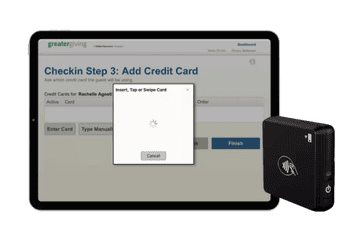
A few quick things to set your team up for a flawless night:
Plan your check-in math. We recommend one check-in station per 50–75 guests. Build that into your venue layout before doors open. For larger events, consider a separate VIP lane with its own tablet and Mobile Card Reader.
Test your tech. Go Time runs on the cloud, so your venue’s Wi-Fi is part of your fundraising team. Walk the space ahead of time — registration, auction tables, checkout — and check signal strength at each spot. If a corner is shaky, line up a backup hotspot before doors open.
Get your card readers ready. Plug in or pair your USB and Bluetooth swipers the day before, not the day of. If you’ve gotten your hands on the new tap-to-pay readers, the swipe-at-check-in workflow becomes nearly invisible to guests.
Why Fundraising Teams Trust Greater Giving
For over 20 years, Greater Giving has helped nonprofits raise billions for their missions, by giving fundraising teams clarity, control, and confidence on event night.
Want to Run Your Smoothest Event Yet?
See how Go Time from Greater Giving can help you cut check-in lines, capture every bid, and deliver unforgettable donor experiences.